
How to Make Melodies Without Knowing Music Theory
Table of Contents
Can you make melodies if you can’t read a single note of music?
You certainly can:
When I first sang my lyrics out loud, the tune that came out sounded like a nursery rhyme.
So, if you can sing a nursery rhyme, you already know more about how to make melodies than you think. Read your lyrics out loud, then try singing or humming them. Let the words rise and fall where the feelings do. Simple, rocking shapes like the songs you learned as a child are a great place to start.
Still stuck? Try one of these ways to make melodies:
- Borrow a melody to get started. Pick a song you love on YouTube and sing your lyrics to its tune. As you keep singing, change a note here and a rhythm there. Little by little, the melody will turn into your own. Just make sure the final version is clearly yours and not a copy of the original.
- Hum over chords. Use a free chord progression generator and loop a progression you like in the background. Hum along over the first line of your first verse until a tune appears, then fit your words to it.
- You might cringe at how you sound at first. Keep going, and let your inner voice take over. There’s music in all of us, and you’ll be surprised at what you can do.
From Your Voice to a Finished Song in Suno v6
Once you’ve learned to make melodies by singing and recording yourself, upload the recording to Suno v6 and use the “cover” feature.
You don’t need a great voice. You need a clear melody.
What counts is that your tune is recognizable: the notes rise and fall clearly, one at a time. If the melody is vague or wobbly, Suno can’t tell what you meant, and it drifts into a melody of its own.
How to help Suno follow your melody:
- Sing clearly, one note at a time. Don’t slide between notes. A simple tune works better than a fancy one.
- Leave clear space between sections. A pause between the verse and chorus tells Suno where each part begins.
- Sing along to a simple beat. A free metronome app, or even tapping your foot, keeps your timing steadier.
- Don’t rush the long notes. Hold them a little longer than feels natural, so the melody has room to breathe.
- Record somewhere quiet. Background noise confuses the AI.
- Raise the audio influence. This setting controls how closely Suno follows your recording. Higher keeps your melody; lower lets Suno improvise. I usually set it around 75 – 80 %.
Does Your Vocal Timing Matter in Suno?
Your voice is just the blueprint. As long as the melody is clear, Suno can build the rest.
- Follow Your Rhythm: Suno uses your recorded melody, cadence, and phrasing as a guide.
- Minor Timing Errors: Suno may smooth out small timing irregularities or adapt the accompaniment to your rhythm.
- Adjust Audio Influence: Experiment with the Audio Influence setting to control how closely Suno follows your recording.
- Edit or Regenerate: If the timing sounds awkward, try adjusting it in Suno Studio or regenerating the section.
My Experience: I’ve had good results even when my timing wasn’t perfect. I find that the overall cadence and structure of the lyrics matter. When corresponding verses have similar syllable counts and aren’t too uneven, Suno generally handles minor timing differences well. It doesn’t work every time, but it’s worth experimenting.
Who Owns the Song When You Make Melodies With AI?
It depends on who created the melody. If AI creates it, only your lyrics are protected. If you write it yourself, the melody is yours too. For the full picture, including what Suno’s terms mean for you, read [AI Music Copyright: 3 Simple, Honest Truths for Songwriters].

How I Make Melodies: My Voice vs. AI
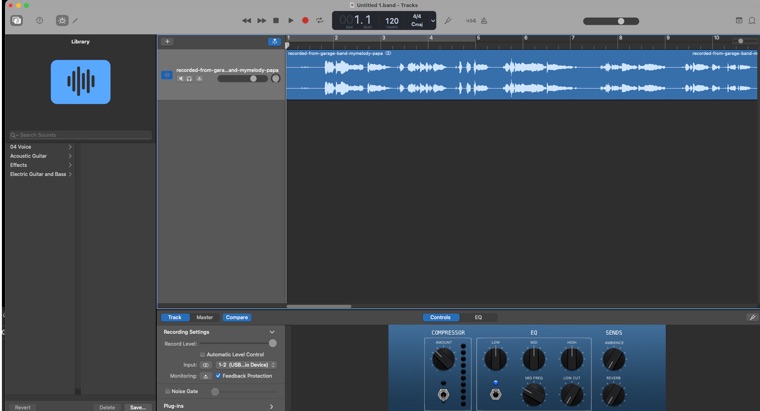
Here’s an example from my song “I Hate the Night.” First, you’ll hear me singing the melody I wrote into GarageBand. Then you’ll hear the same melody brought to life with AI.
Last year, I released the first version of “I Hate the Night” as a disco track. I wrote the lyrics, but the music was entirely AI-made. This time, the melody is one I sang myself. [Hear the original disco version here – /i-hate-the-night/]
Try a free melody tool: BandLab
If you’d like to see your melody instead of just hearing it, try BandLab, a free music studio that works in your web browser or as an app on your phone or tablet. You’ll need a free account, and your projects are saved online, so you can pick them up on any device.
Here’s how to sketch a melody in it:
- Start a new project and add an instrument track, such as a piano.
- Open the piano roll, a grid where higher notes sit higher up and time moves left to right.
- Click to place a note, drag it up or down to change the pitch, and drag its end to make it longer. Unlike simpler tools, you can hold a note for as long as your melody needs.
- Press play, listen, and adjust until it sounds right.
You can also record your own voice on a separate track, so you can line up your drawn notes with the melody you sang. It’s a simple way to check every note before you bring your song into Suno.
Bandlab: https://www.bandlab.com